 Kia Optima: Removal and Installation
|
1. |
Disconnect the battery negative terminal first, then
the positive terminal.
Tightening torque
:(+) terminal : 7.8 ~ 9.8N.m (0.8 ~ 1.0kgf.m,
5.8 ~ 7.2lb-ft)
(-) terminal : 4.0 ~ 6.0N.m (0.4 ~ 0.6kgf.m,
3.0 ~ 4.4lb-ft)
|
|
|
2. |
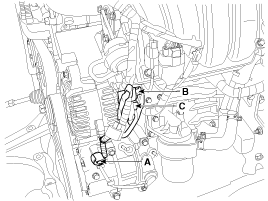
Disconnect the A/C compressor switch connector (A)
the alternator connector (B), and the cable from alternator "B" terminal
(C).
|
|
3. |
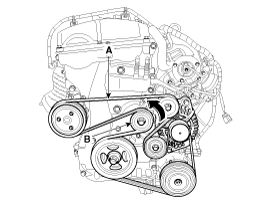
Remove the drive belt (A) after turning the drive
belt tensioner (B) counterclockwise.
|
|
4. |
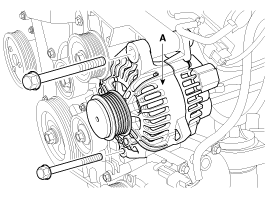
Pull out the through bolt and then remove the alternator
(A).
Tightening torque
:49.0 ~ 63.7N.m (5.0 ~ 6.5kgf.m, 36.2 ~ 47.0lb-ft)
|
|
|
5. |
Installation is the reverse order of removal. |
1.
Remove the alternator cover (A) using a screw driver
after loosening the nuts (B).
2.
Remove the slip ring guide (A) and then loosen the
...
See also:
Cup holder
WARNING - Hot liquids
Do not place uncovered cups of hot liquid in the cup holder while the
vehicle is in motion. If the hot liquid spills, you may burn yourself. Such
a burn to the driver ...
System Operation
Ventilation
1. Set the mode selection switch to the
position.
2. Set the air intake control switch to the outside air position.
3. Set the temperature control knob to the desired position.
4. Se ...
Keyless Entry System
You can also lock or unlock the door and open the trunk from outside with the
keyless transmitter.
• To lock the
door, press this button once. (Hazard flasher lights are turned on once fo ...


 Disassembly