
 Kia Optima: Seat height (for driver’s seat)
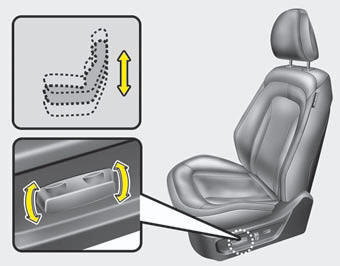
Pull the front portion of the control switch up to raise or down to lower the front part of the seat cushion. Pull the rear portion of the control switch up to raise or down to lower the rear part of the seat cushion. Release the switch once the seat reaches the desired position.
 Seatback angle
Push the control switch forward or backward to move the seatback to the desired
angle. Release the switch once the seat reaches the desired position. ...
 Lumbar support
The lumbar support can be adjusted by pressing the lumbar support switch on the
side of the drivers seat. Press the front portion of the switch to increase support,
or the rear portion of the sw ...
See also:
Components and Components Location
Components Location
1. Overdrive clutch (OD/C)
2. One way clutch (OWC)
3. Low & Reverse brake (LR/B)
4. Underdrive brake (UD/B)
5. 26 brake(26/B)
6. 35R cl ...
Adjustment After Headlight Assembly Replacement
If the vehicle has had front body repair and the headlight assembly has been
replaced, the headlight aiming should be checked using the aiming screen as shown
in the illustration. Turn on the he ...
Auto Light Switch. Repair procedures
Inspection
Lighting Switch InspectionWith the multi function switch in each position, make
sure that continuity exists between the terminals below. If continuity is not as
specified, replace the ...
Categories
Kia Optima Manuals
- Kia Optima DL3 2019-2026 Owners Manual
- Kia Optima DL3 2019-2026 Service and Repair Manual
- Kia Optima TF 2011-{2019} Owners Manual
- Kia Optima TF 2011-2026 Service Manual
- Kia Optima MS/Magentis 2000-2005 Owners Manual
