 Kia Optima: Removal
| Pressure Side Impact Sensor |
| • |
Removal of the airbag
must be performed according to the precautions/procedures described
previously. |
| • |
Before disconnecting
the side impact sensor connector(s), disconnect the side airbag
connector(s). |
| • |
Do not turn the ignition
switch ON and do not connect the battery cable while replacing the
side impact sensor. |
|
| 1. |
Disconnect the battery negative
cable, and wait for at least three minutes before beginning work. |
| 2. |
Remove the front door trim. (Refer
to the Body group- Front door) |
| 3. |
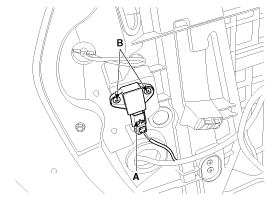
Disconnect the pressure side
impact sensor connector (A) and remove the pressure side impact sensor mounting
screws (B).
|
Side Impact Sensor
| 1. |
Disconnect the battery negative
cable and wait for at least three minutes before beginning work. |
| 2. |
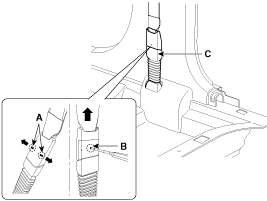
To remove the seat belt anchor
pretensioner, keep on pushing the lock pin (A) as arrow direction. And then
remove the seat belt after pushing the lock pin (B).
|
| 3. |
Remove the door scuff trim. (Refer
to the Body group - Interior trim) |
| 4. |
Remove the center pillar trim.
(Refer to the Body group - Interior trim) |
| 5. |
Disconnect the side impact sensor
connector. |
| 6. |
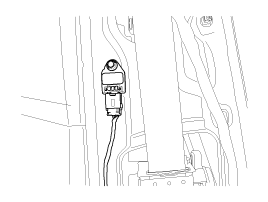
Loosen the side impact sensor
mounting bolt and remove the side impact sensor.
|
Pressure Side Impact Sensor
1.
Install the new pressure side
impact sensor with the screws then connect the pressure side impact sensor
connector.
Tightening t ...
See also:
Installation
•
Be sure to check the low pressure fuel hose
quick-connector (A) is completely connected to the high pressure ...
Inspection
[Motor]
1.
Turn ignition switch OFF.
2.
Disconnect the EWGA connector.
3.
Check that the EWGA is stuck by foreign material.
...
Timing Chain. Components and Components Location
1. Intake camshaft
2. Exhaust camshaft
3. Intake CVVT assembly
4. Exhaust CVVT assembly
5. Timing chain
6. Timing chain guide
7. Timing chain tensioner ...



 Installation