
 Kia Optima: Removal
Parking Assist Sensor
| 1. | Disconnect the negative (-) battery terminal. |
| 2. | Remove the rear bumper. (Refer to the BD group - "Rear bumper") |
| 3. | Disconnect the connector (A)
connected to the rear bumper.
|
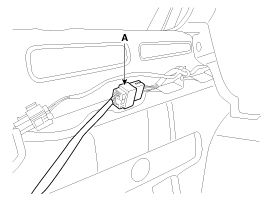
| 4. | Pull out the sensor (A) by opening
the sensor holder (B) out.
|
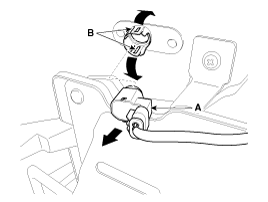
| 5. | Disconnect the sensor connector
(B) from the sensor (A) inside of the rear bumper.
|
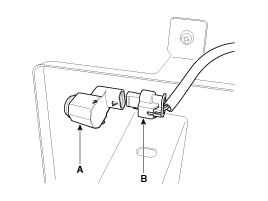
| 1. | Disconnect the negative (-) battery terminal. |
| 2. | Remove the crash pad lower panel.
(Refer to the BD group - "Crash pad") |
| 3. | Remove the steering column assembly. (Refer to the ST group - "Steering column and shaft") |
| 4. | Remove the BCM.
(Refer to the "Body control module") |
| 5. | Remove the buzzer (A) after loosening
the bolt and disconnecting the 2P connector.
|
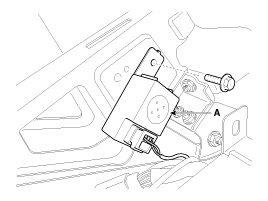
| 1. | Disconnect the negative (-) battery terminal. |
| 2. | Remove the crash pad lower panel. (Refer to the BD group - "Crash pad") |
| 3. | Remove the crash pad side switch
assembly (A) as shown below picture.
|
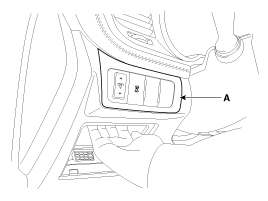

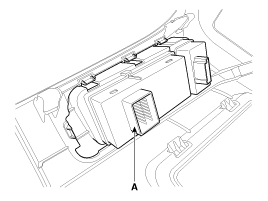
| 4. | Remove the RPAS switch (A) after
disconnecting the connector.
|

 Installation
Parking Assist Sensor
1.
Connect the connector, and then
install the sensor.
2.
Install the rear bumper.
Buzzer
1.
Install the buzzer.
2.
In ...
See also:
Components and Components Location
Component Location
1. Driver power window main switch
2. Passenger power window switch
3. Front window motor
4. Rear window motor
5. Rear window switch
...
Components
1. Duct Seal
2. Duct Case
3. Inlet Door
4. Intake Actuator
5. Inlet Duct Case (A)
6. Climate Control Air Filter
7. Cluster Ionizer
8. Climate Control Air Fi ...
Categories
Kia Optima Manuals
- Kia Optima DL3 2019-2026 Owners Manual
- Kia Optima DL3 2019-2026 Service and Repair Manual
- Kia Optima TF 2011-{2019} Owners Manual
- Kia Optima TF 2011-2026 Service Manual
- Kia Optima MS/Magentis 2000-2005 Owners Manual

Copyright © www.kiopman.com 2026