
 Kia Optima: Repair procedures
Inspection
Front Door Lock Actuator Inspection| 1. | Remove the front door trim. (Refer to the BD group - "Front door") |
| 2. | Remove the front door module. |
| 3. | Disconnect the 7P connector from
the actuator.
|
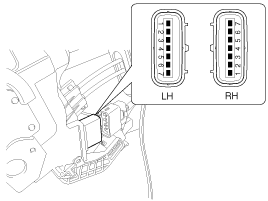
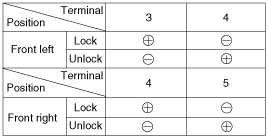
| 4. | Check actuator operation by connecting
power and ground according to the table. To prevent damage to the actuator,
apply battery voltage only momentarily.
|
| 1. | Remove the rear door trim. (Refer to the BD group - "Rear door") |
| 2. | Remove the rear door module. |
| 3. | Disconnect the 7P connector from
the actuator.
|
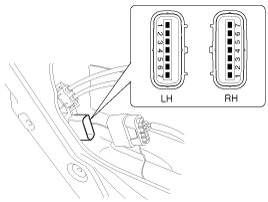
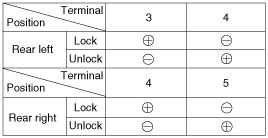
| 4. | Check actuator operation by connecting
power and ground according to the table. To prevent damage to the actuator,
apply battery voltage only momentarily.
|
| 1. | Remove the trunk lid trim panel. (Refer to the BD group - "Trunk lid") |
| 2. | Disconnect the 3P connector from
the actuator.
|
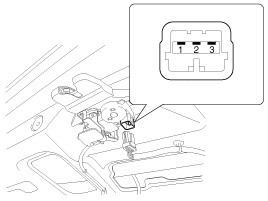
| 3. | Check actuator operation by connecting
power and ground according to the table. To prevent damage to the actuator,
apply battery voltage only momentarily.
|

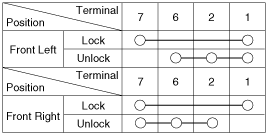
| 1. | Remove the front door trim panel. (Refer to the BD group - "Front door") |
| 2. | Remove the front door module. |
| 3. | Disconnect the 7P connector from
the actuator.
|
| 4. | Check for continuity between
the terminals in each switch position when inserting the key into the door
according to the table.
|
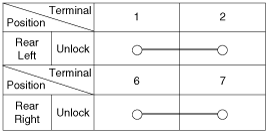
| 1. | Remove the rear door trim panel. (Refer to the BD group - "Rear door") |
| 2. | Remove the rear door module. |
| 3. | Disconnect the 7P connector from
the actuator.
|
| 4. | Check for continuity between
the terminals in each switch position according to the table.
|
| 1. | Remove the trunk lid trim. (Refer to the BD group - "Trunk lid") |
| 2. | Disconnect the 3P connector from
the actuator.
|
| 3. | Check for continuity between
the terminals in each switch position according to the table.
|

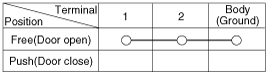
Remove the door switch and check for continuity between the terminals.
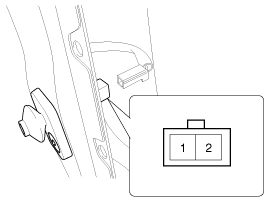
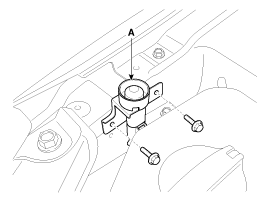
| 1. | Disconnect the connector from
the hood switch (A).
|
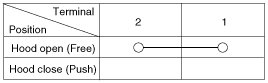
| 2. | Check for continuity between
the terminals and ground according to the table.
|
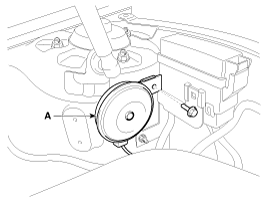
| 1. | Remove the burglar horn (A) after
removing 1 bolt and disconnect the 2P connector from the burglar horn.
|
| 2. | Test the burglar horn by connecting battery power to the terminal 1 and ground the terminal 2. |
| 3. | The burglar horn should make a sound. If the burglar horn fails to make a sound replace it. |
 Functions
DISARMCondition 1
State
Description
Initial Condition
ALARM
Event
-
IGN KEY ON during 30sec
or ALT ...

See also:
Opening the trunk
Press the trunk unlock button for more than 1 second on the transmitter
(or smart key).
Press the button on the trunk handle with the smart key in your possession.
Once the trunk is opene ...
Repair procedures
On-vehicle Inspection
•
Check that the battery cables are connected
to the correct terminals.
...
When to replace seat belts
The entire in-use seat belt assembly or assemblies should be replaced if the
vehicle has been involved in an accident. This should be done even if no damage
is visible. Additional questions concer ...
Categories
Kia Optima Manuals
- Kia Optima DL3 2019-2026 Owners Manual
- Kia Optima DL3 2019-2026 Service and Repair Manual
- Kia Optima TF 2011-{2019} Owners Manual
- Kia Optima TF 2011-2026 Service Manual
- Kia Optima MS/Magentis 2000-2005 Owners Manual
