
 Kia Optima: Removal
|

| 1. | Disconnect the negative (-) battery terminal. |
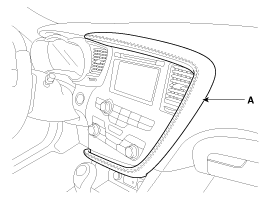
| 2. | Using a screwdriver or remover,
remove the crash pad garnish RH (A).
|
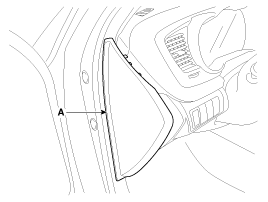
| 3. | Using a screwdriver or remover,
remove the crash pad side cover (A).
|
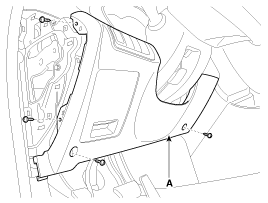
| 4. | After loosening the crash pad
lower panel mounting screws, then remove the lower panel (A).
|
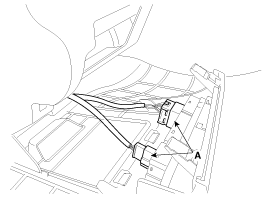
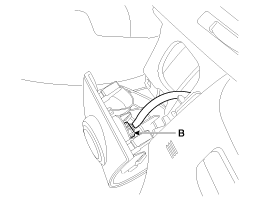
| 5. | Remove the switch connector (A)
and SSB connector (B) from crash pad lower panel.
|
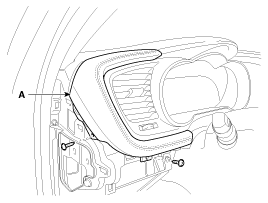
| 6. | Remove the crash pad garnish
LH (A) after removing the screws.
|
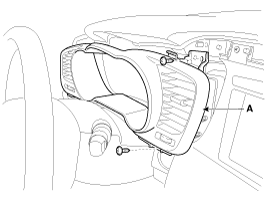
| 7. | Remove the instrument cluster
fascia panel (A) after loosening the screws.
|
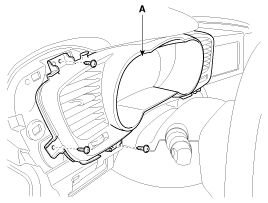
| 8. | Remove the instrument cluster
(A) after loosening the screws.
|
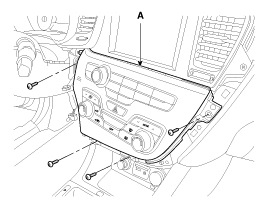
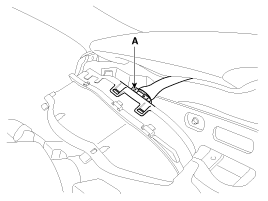
| 9. | Disconnect the cluster connector
(A), then remove the cluster.
|
 Inspection
Speedometer
1.
Adjust the pressure of the tires
to the specified level.
2.
Drive the vehicle onto a speedometer
tester. Use wheel chocks (A) as appropriate.
...
 Installation
1.
Install the cluster to the cluster
housing.
2.
Install the cluster fascia panel
and crash pad side garnish [LH].
3.
Install the crash pad lower pan ...
See also:
Interior light
CAUTION
Do not use the interior lights for extended periods when the engine is not running.
It may cause battery discharge.
WARNING
Do not use the interior lights when driving in the dark. Accid ...
Replacement
Trunk Lid Assembly Replacement
•
When removing and installing
the trunk lid, an assistant is necessary.
...
MAX A/C-Level (B, D, E)
To operate the MAX A/C, turn the temperature knob to extreme left. Air flow is
directed toward the upper body and face. In this mode, the air conditioning and
the recirculated air position will ...
Categories
Kia Optima Manuals
- Kia Optima DL3 2019-2026 Owners Manual
- Kia Optima DL3 2019-2026 Service and Repair Manual
- Kia Optima TF 2011-{2019} Owners Manual
- Kia Optima TF 2011-2026 Service Manual
- Kia Optima MS/Magentis 2000-2005 Owners Manual

Copyright � www.kiopman.com 2026