
 Kia Optima: Lumbar support (for driver’s seat)
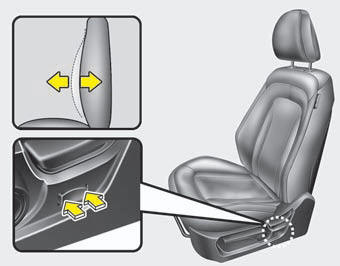
Press the front portion of the switch to increase support, or the rear portion of the switch to decrease support.
 Seat height
To change the height of the seat, move the lever upwards or downwards.
To lower the seat cushion, push down the lever several times.
To raise the seat cushion, pull up the lever several times. ...
 Automatic adjustment (if equipped)
The front seat can be adjusted by using the control knob located on the outside
of the seat cushion. Before driving, adjust the seat to the proper position so as
to easily control the steering whe ...
See also:
Rear Combination Light Bulb Replacement
1. Using a cross-tip screwdriver, remove the cover.
2. Turn the bulb socket counterclock-wise and remove it from the housing.
3. Push the bulb in, then rotate it one quarter turn counterclockwise ...
Vehicle Certification Label (MVSS Label)
The VIN also appears on the vehicle’s certification label and VIN label on the
pillar.
Chassis Number
Vehicle Emission Control Information/Vacuum Hose Routing Diagram
Tire Information Lab ...
Components and Components Location
Component Location
1. BCM
2. Ultrasonic sensor
3. Buzzer
※ Rear parking assist control unit function and buzzer are built in BCM
(bod ...
Categories
Kia Optima Manuals
- Kia Optima DL3 2019-2026 Owners Manual
- Kia Optima DL3 2019-2026 Service and Repair Manual
- Kia Optima TF 2011-{2019} Owners Manual
- Kia Optima TF 2011-2026 Service Manual
- Kia Optima MS/Magentis 2000-2005 Owners Manual
