
 Kia Optima: Instrument panel illumination
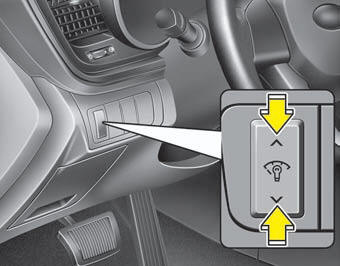
The instrument panel illumination intensity can be adjusted by pressing the control switch with the headlight switch in any position when the ignition switch is in the ON position.
The illumination intensity is shown on the instrument cluster LCD display.
 Instrument cluster
Type A
Type B
1. Tachometer 2. Fuel gauge 3. Speedometer 4. Turn signal indicators
5.Warning and indicator lights 6. Odometer/Trip computer*
* : if equipped
* The actual cluster in the vehic ...
 Gauges
...
See also:
Shift Lock System
For your safety, the Automatic Transaxle has a shift lock system which prevents
shifting the transaxle out of P (Park) unless the brake pedal is depressed.
To shift the transaxle out of P (Park):
...
Oil Capacity
2400cc 4-cyl. Engine
- Without filter change : 4.2 qts (4.0 liters)
- With filter change : 4.5 qts (4.3 liters)
2700cc V-6 Engine
- Without filter change : 4.75 qts (4.5 liters)
- With fi ...
Components and Components Location
Components
...
Categories
Kia Optima Manuals
- Kia Optima DL3 2019-2026 Owners Manual
- Kia Optima DL3 2019-2026 Service and Repair Manual
- Kia Optima TF 2011-{2019} Owners Manual
- Kia Optima TF 2011-2026 Service Manual
- Kia Optima MS/Magentis 2000-2005 Owners Manual
