
 Kia Optima: Aux, USB and iPod®* port
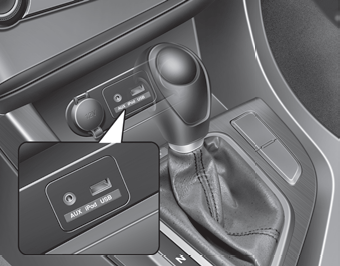
If your vehicle has an aux and/or USB(universal serial bus) port or iPod® port, you can use an aux port to connect audio devices and an USB port to plug in an USB and also an iPod® port to plug in an iPod®.
✽ NOTICE
When using a portable audio device connected to the power outlet, noise may occur during playback. If this happens, use the power source of the portable audio device.
* iPod® is a trademark of Apple Inc.
 Steering wheel audio controls
The steering wheel may incorporate audio control buttons.
CAUTION
Do not operate audio remote control buttons simultaneously.
VOLUME ( +/- ) (1)
Press the lever upward ( ) to increase the vo ...
 How vehicle audio works
AM and FM radio signals are broadcast from transmitter towers located around
your city. They are intercepted by the radio antenna on your vehicle. This signal
is then received by the radio and s ...
See also:
Owner’s Responsibility
NOTICE
Maintenance, Service and Record Retention are the owner’s responsibility.
You should retain documents to show proper maintenance has been performed on
your vehicle in accordance with the ...
Removal
1.
Remove the head lamp leveling
unit connector (A).
2.
Loosen the mounting bolts (3EA)
of automatic head lamp leveling unit assembly.
Tighting torq ...
Component (2)
...
Categories
Kia Optima Manuals
- Kia Optima DL3 2019-2026 Owners Manual
- Kia Optima DL3 2019-2026 Service and Repair Manual
- Kia Optima TF 2011-{2019} Owners Manual
- Kia Optima TF 2011-2026 Service Manual
- Kia Optima MS/Magentis 2000-2005 Owners Manual
