
 Kia Optima: Distance to Service
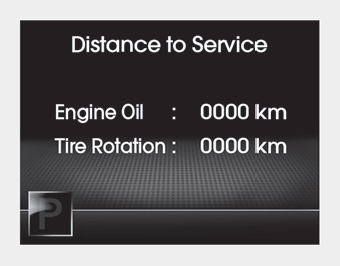
To enter the "Distance to Service" mode, press the TRIP button for less than 1 second.
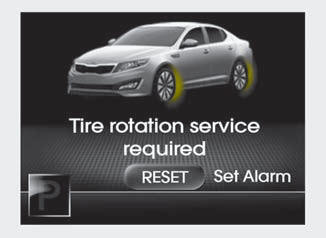
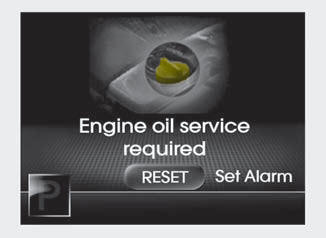
Engine Oil(Tire Rotation) Service Required
1. If service is required, the message will be displayed.
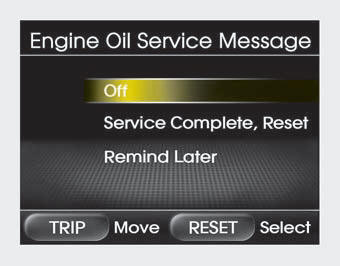
2. If you would like to reset or inactivate the maintenance system press the RESET button for more than 1 second. The display will change to "Engine Oil Service Message" mode.
You can move to items by pressing the TRIP button and select the desired item by pressing the RESET button.
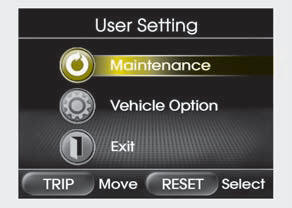
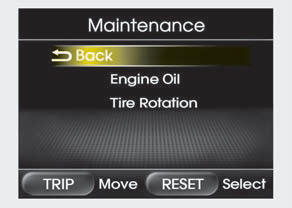
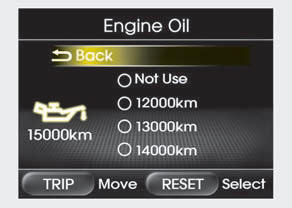
Maintenance
1. When the vehicle is at a standstill, pressing the TRIP button for more than 2 seconds with the ENGINE START/ STOP button in the ON position or engine running, the LCD display on the cluster will change to the "User Setting" mode.
You can move to the items by pressing the TRIP button and select the item by pressing the RESET button.
2. In the "User Setting" mode select "Maintenance".
3. Select the desired maintenance schedule.
4. If finished, you can come out of the Maintenance mode by pressing the TRIP button for more than 2 seconds.
 Trip computer
The trip computer is a microcomputercontrolled driver information system that
displays information related to driving on the display when the ignition switch
is in the ON position. All stored dr ...
 Vehicle option
1. When the vehicle is at a standstill, pressing the TRIP button for more than
2 seconds with the ENGINE START/STOP button in the ON position or engine running,
the LCD display on the cluster wi ...
See also:
Registering Your Vehicle in a Foreign Country
If you plan to register your vehicle in a foreign country, you should confirm
that it conforms to the regulations in that country. Even if you successfully register
the vehicle in a foreign countr ...
SRS components and functions
The SRS consists of the following components:
1. Driver's front air bag module 2. Passenger's front air bag module 3. Side
impact air bag modules 4. Curtain air bag modules 5. Retractor p ...
Removal
1.
Turn the ignition switch OFF and disconnect the battery
negative (-) cable.
2.
Disconnect the ventilation hose (A) from the fuel
tank air filter. ...
Categories
Kia Optima Manuals
- Kia Optima DL3 2019-2026 Owners Manual
- Kia Optima DL3 2019-2026 Service and Repair Manual
- Kia Optima TF 2011-{2019} Owners Manual
- Kia Optima TF 2011-2026 Service Manual
- Kia Optima MS/Magentis 2000-2005 Owners Manual
