
 Kia Optima: Vehicle option
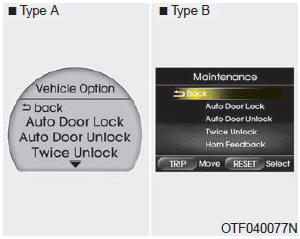
1. When the vehicle is at a standstill, pressing the TRIP button for more than
2 seconds with the ENGINE START/STOP button in the ON position or engine running,
the LCD display on the cluster will change to the "User Setting" mode. You can move
to items by pressing the TRIP button and select the item by pressing the RESET button.
2. In the "User Setting" mode, select "Vehicle Option".
3. Move (TRIP button)
to the desired item and select (RESET button).
Auto Door Lock
Off - The auto door lock operation will be canceled.
Speed - All doors will be automatically locked when the vehicle speed exceeds 15 km/h (9.3 mph).
Shift Lever - All doors will be automatically locked if the shift lever is shifted from the P(Park) position to the R(Reverse), N(Neutral) or D(Drive) position.
Auto Door Unlock
Off - The auto door unlock operation will be inactivated.
Key Out - All doors will be automatically unlocked when the ignition key is removed from ignition switch (or smart key is removed from the smart key holder).
Shift Lever - All doors will be automatically unlocked if the shift lever is shifted to the P (Park) position.
Twice Unlock
On - The driver’s door will unlock if the door is unlocked. When the door is unlocked again within 4 seconds, all doors will unlock.
Off - The two turn unlock function will be inactivated. Therefore, all doors will unlock if the door is unlocked.
❈ Except the central door lock switch.
Seat Easy Access (only for Driver Position Memory System equipped vehicle)
On - The driver's seat will automatically move forward or rearward for the driver to enter or exit the vehicle comfortably.
Off - The Seat Easy Access function will be inactivated.
Headlamp Escort
On - The Headlamp Escort and Escort Welcome function will be activated.
Off - The Headlamp Escort and Escort Welcome function will be inactivated.
Welcome Light (if equipped)
On - The Welcome Light function will be activated.
Off - The Welcome Light function will be inactivated.
Welcome Sound
On - The Welcome Sound function will be activated.
Off - The Welcome Sound function will be inactivated.
Auto Triple Turn (One-touch triple turn signal)
On - The lane change signals will blink 3 times when the turn signal lever is moved slightly.
Off - The Auto Triple Turn function will be inactivated.
Horn feedback
On - The hazard warning light will blink and the horn will sound when the door is locked or unlocked with the transmitter or smart key.
Off - The hazard warning light will blink but the horn will not sound when the door is locked or unlocked with the transmitter or smart key.
AVG fuel economy
Auto Reset - The average fuel economy will reset automatically when you drive after refueling.
Manual Reset - The average fuel economy will not reset automatically when you drive after refueling.
 Distance to Service
To enter the "Distance to Service" mode, press the TRIP button for less than
1 second.
Engine Oil(Tire Rotation) Service Required
1. If service is required, the message will be dis ...
 Warnings and indicators
All warning lights are checked by turning the ignition switch ON (do not start
the engine). Any light that does not illuminate should be checked by an authorized
Kia dealer.
After starting the en ...
See also:
Automatic turn off function
The interior lights automatically turn off approximately 20 minutes after the
ignition switch is turned off.
If your vehicle is equipped with the theft alarm system, the interior lights
automatic ...
Map lamp
Push the lens to turn the map lamp on or off. This light produces a spot beam
for convenient use as a map lamp at night or as a personal lamp for the driver and
the front passenger.
• DOOR : ...
Removal
Replacing an on/off solenoid valve (SS-A, SS-B) does not require additional
hydraulic pressure adjustment; however, the hydraulic pre ...
Categories
Kia Optima Manuals
- Kia Optima DL3 2019-2026 Owners Manual
- Kia Optima DL3 2019-2026 Service and Repair Manual
- Kia Optima TF 2011-{2019} Owners Manual
- Kia Optima TF 2011-2026 Service Manual
- Kia Optima MS/Magentis 2000-2005 Owners Manual
