 Kia Optima: Replacement
| 1. |
Loosen the wheel nuts slightly.
Raise the vehicle, and make sure it is securely supported.
|
| 2. |
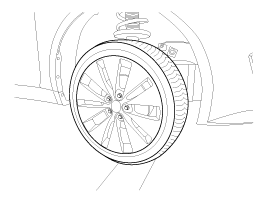
Remove wheel nuts, front wheel
and tire from front hub.
Tightening torque:88.2
~ 107.8 N.m (9.0 ~ 11.0 kgf.m, 65.0 ~ 79.5 lb-ft)
|
|
Be careful not to damage to the wheel nuts when removing the front
wheel and tire. |
|
| 3. |
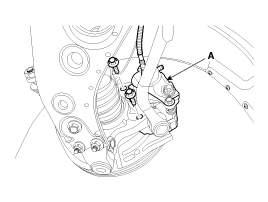
Remove the brake caliper mounting
bolts, and then hold the brake caliper assembly (A) with wire.
Tightening torque:78.4
~ 98.0 N.m (8.0 ~ 10.0 kgf.m, 57.8 ~ 72.3 lb-ft)
|
|
| 4. |
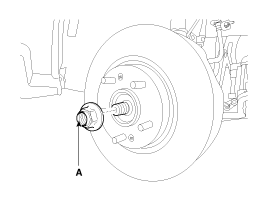
Remove driveshaft nut (A) from
the front hub when applying the brake.
Tightening torque:215.7
~ 254.9 N.m (22.0 ~ 26.0 kgf.m, 159.1 ~ 188.0 lb-ft)
|
|
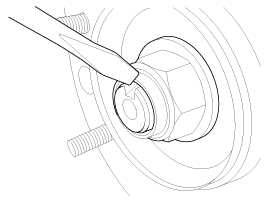
After installation lock nut, stake the lock nut using a chisel and
hammer as shown in the illustration below. |
|
| 5. |
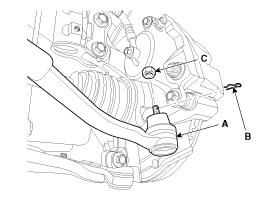
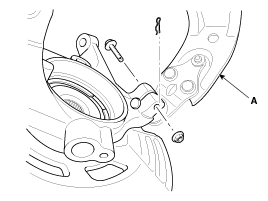
Remove the tie rod end ball joint
(A) from the knuckle.
| (1) |
Remove the split pin
(C). |
| (2) |
Remove the castle nut
(B).
Tightening torque:
34.3 ~ 44.0 N.m (3.5 ~ 4.5 kgf.m, 25.3 ~ 32.5 lb-ft)
|
|
|
| 6. |
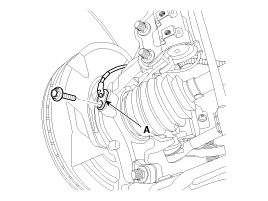
Loosen the mount bolt and then
remove the wheel speed sensor (A) from knuckle.
Tightening torque:6.8 ~
10.7 N.m (0.7 ~ 1.1 kgf.m, 5.0 ~ 7.9 lb-ft)
|
|
| 7. |
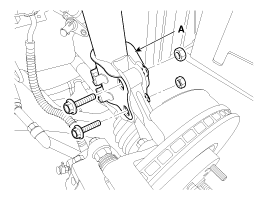
Loosen the bolt & nut and then
remove the knuckle from the strut assembly (A).
Tightening torque:156.9
~ 176.5N.m (16.0 ~ 18.0kgf.m, 115.7 ~ 130.2lb-ft)
|
|
| 8. |
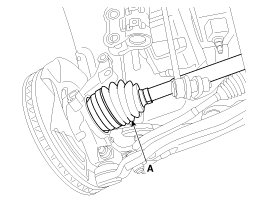
Disconnect the driveshaft (A)
from the front hub assembly.
|
| 9. |
Loosen the bolt & nut and then
remove the lower arm (A).
Tightening torque:98.0
~ 117.6 N.m (10.0 ~ 12.0 kgf.m, 72.3 ~ 86.7 lb-ft)
|
|
| 10. |
Install in the reverse order
of removal. |
1.
Check the hub for cracks and
the splines for wear.
2.
Check the brake disc for scoring
and damage.
3.
Check the knuckle for cracks
4. ...
See also:
Instrument panel illumination
The instrument panel illumination intensity can be adjusted by pressing the control
switch with the headlight switch in any position when the ignition switch is in
the ON position.
The illumina ...
Instrument cluster
Type A
Type B
1. Tachometer 2. Fuel gauge 3. Speedometer 4. Turn signal indicators
5.Warning and indicator lights 6. Odometer/Trip computer*
* : if equipped
* The actual cluster in the vehic ...
Installation
1.
Installation is the reverse of
removal.
Make sure vehicle does not roll before setting room sid ...



 Inspection