
 Kia Optima: Releasing the parking brake
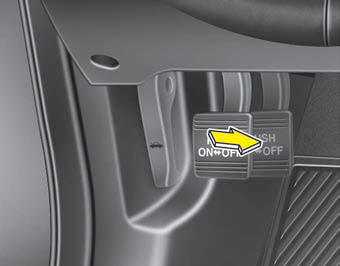
Foot type
To release the parking brake, depress the parking brake pedal a second time while applying the foot brake. The pedal will automatically extend to the fully released position.
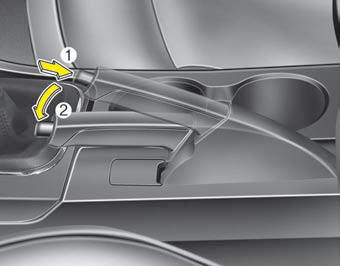
Hand type
To release the parking brake, first apply the foot brake and pull up the parking brake lever slightly. Secondly depress the release button (1) and lower the parking brake lever (2) while holding the button.
If the parking brake does not release or does not release all the way, have the system checked by an authorized Kia dealer.
 WARNING
- To prevent unintentional movement when stopped and leaving the vehicle, do not use the gearshift lever in place of the parking brake. Set the parking brake AND make sure the gearshift lever is securely positioned in 1st (First) gear or R (Reverse) for manual transaxle equipped vehicles and in P (Park) for automatic transaxle equipped vehicles.
- Never allow anyone who is unfamiliar with the vehicle to touch the parking brake. If the parking brake is released unintentionally, serious injury may occur.
- All vehicles should always have the parking brake fully engaged when parking to avoid inadvertent movement of the vehicle which can injure occupants or pedestrians.

Check the brake warning light by turning the ignition switch ON (do not start the engine). This light will illuminate when the parking brake is applied with the ignition switch in the START or ON position.
Before driving, be sure the parking brake is fully released and the brake warning light is off.
If the brake warning light remains on after the parking brake is released while the engine is running, there may be a malfunction in the brake system. Immediate attention is necessary.
If at all possible, stop driving the vehicle immediately. If that is not possible, use extreme caution while operating the vehicle and only continue to drive the vehicle until you can reach a safe location or repair shop.
 Applying the parking brake
Foot type
To engage the parking brake, first apply the foot brake and then depress the parking brake pedal down as far as possible.
Hand type
To engage the parking brake, first apply the foot ...
 Anti-lock brake system (ABS)
WARNING
ABS (or ESC) will not prevent accidents due to improper or dangerous driving
maneuvers. Even though vehicle control is improved during emergency braking, always
maintain a safe distance ...
See also:
Vanity mirror lamp
Push the switch to turn the light on or off.
: The lamp will turn on if this
button is pressed.
: The lamp will turn off if this
button is pressed.
CAUTION - Vanity mirror lamp (if equippe ...
Troubleshooting
Basic Troubleshooting
Basic Troubleshooting Guide
Customer Problem Analysis Sheet
Basic Inspection ProcedureMeasuring Condition of Electronic Parts' Resistance
The measured resistance at hi ...
Removal
[Without EPB]
1.
Remove the rear wheel & tire.
Tightening torque:88.3
~107.9 N.m(9.0 ~11.0 kgf.m, 65.1 ~79.6 lb-ft)
2.
Rem ...
Categories
Kia Optima Manuals
- Kia Optima DL3 2019-2026 Owners Manual
- Kia Optima DL3 2019-2026 Service and Repair Manual
- Kia Optima TF 2011-{2019} Owners Manual
- Kia Optima TF 2011-2026 Service Manual
- Kia Optima MS/Magentis 2000-2005 Owners Manual
