
 Kia Optima: Interior overview
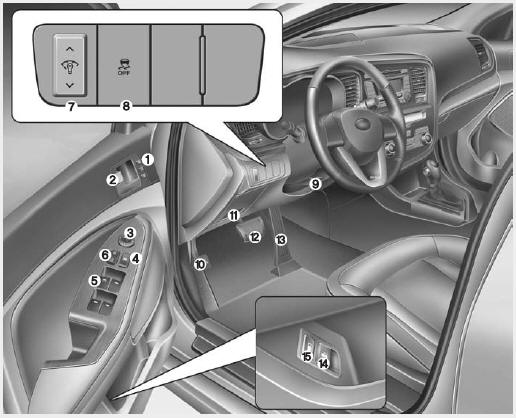
1. Driver position memory system*
2. Door lock/unlock button
3. Outside rearview
mirror control switch*
4. Power window lock button*
5. Power window switches*
6. Central door lock switch*
7. Instrument panel illumination control switch*
8. ESC OFF button
9. Steering wheel tilt lever*
10. Hood release lever
11.
Fuse box
12. Brake pedal
13. Accelerator pedal
14. Trunk lid release lever
15. Fuel filler lid release lever
* : if equipped

 Instrument panel overview
1. Instrument cluster 2. Light control / Turn signals 3. Wiper/Washer 4.
Horn 5. Steering wheel audio control* 6. Auto cruise control* 7. Driver’s
air bag 8. Steering wheel 9. Ignition switch* ...
See also:
Noise and Smoke
When the air bags inflate, they make a loud noise and they leave smoke and powder
in the air inside of the vehicle. This is normal and is a result of the ignition
of the air bag inflator.
After t ...
Phone Book (In-Vehicle)
• Adding entry by voice
Phone numbers and voice tags can be registered. Entries registered in the phone
can also be transferred.
➀ Press button. ➁ Say "Phonebook".
- T ...
Positive Crankcase Ventilation (PCV) Valve. Description and Operation
Operation Principle
...
Categories
Kia Optima Manuals
- Kia Optima DL3 2019-2026 Owners Manual
- Kia Optima DL3 2019-2026 Service and Repair Manual
- Kia Optima TF 2011-{2019} Owners Manual
- Kia Optima TF 2011-2026 Service Manual
- Kia Optima MS/Magentis 2000-2005 Owners Manual
