 Kia Optima: Console. Repair procedures
Replacement
Floor Console Replacement
| • |
When prying with a flat-tip
screwdriver, wrap it with protective tape, and apply protective
tape around the related parts, to prevent damage. |
| • |
Put on gloves to protect
your hands. |
|
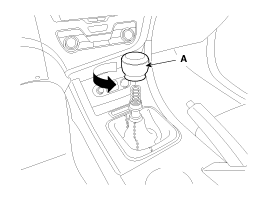
| 1. |
Remove the gear knob (A).
|
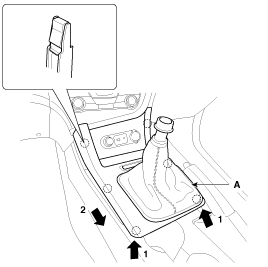
| 2. |
Using a screwdriver or remover,
remove the floor console upper cover (A).
|
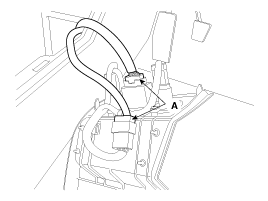
| 3. |
Disconnect the connectors (A).
|
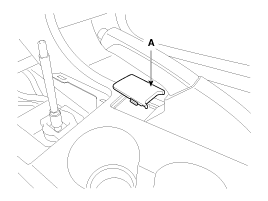
| 4. |
Using a screwdriver or remover,
remove the hand brake cover (A).
|
| 5. |
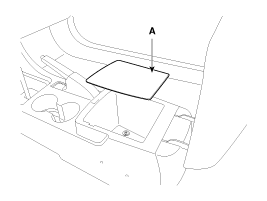
Remove the console tray mat (A).
|
| 6. |
Using a screwdriver or remover,
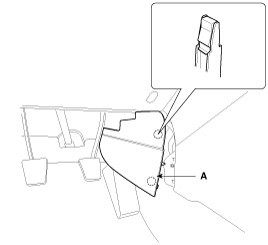
remove the floor console extension cover (A).
|
| 7. |
After loosening the mounting
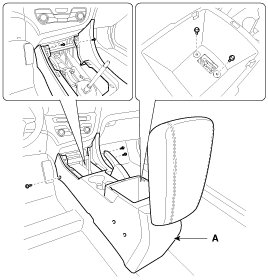
screws and bolts, then remove the floor console assembly (A).
|
| 8. |
Installation is the reverse of
removal.
| •
|
Make sure the
connectors are connected in properly. |
| •
|
Replace any damaged
clips. |
|
|
| • |
When prying with a flat-tip
screwdriver, wrap it with protective tape, and apply protective
tape around the related parts, to prevent damage. |
| • |
Put on gloves to protect
your hands. |
|
| 1. |
Using a screwdriver or remover,
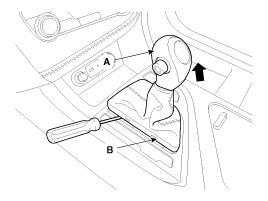
remove the gear boots (B) and gear knob (A).
|
| 2. |
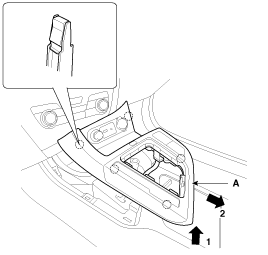
Using a screwdriver or remover,
remove the floor console upper cover (A).
|
| 3. |
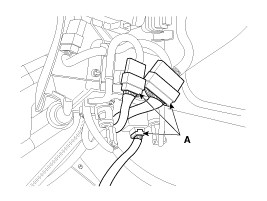
Disconnect the connectors (A).
|
| 4. |
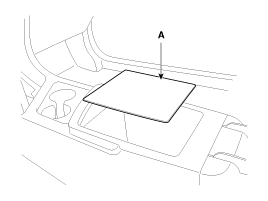
Remove the console tray mat (A).
|
| 5. |
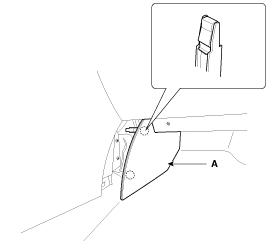
Using a screwdriver or remover,
remove the floor console extension cover (A).
|
| 6. |
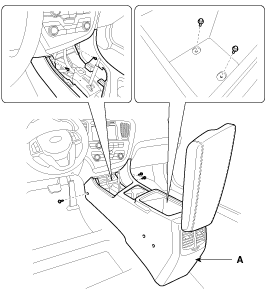
After loosening the mounting
screws and bolts, then remove the floor console assembly (A).
|
| 7. |
Installation is the reverse of
removal.
| •
|
Make sure the
connectors are connected in properly. |
| •
|
Replace any damaged
clips. |
|
|
Armrest Replacement
| • |
When prying with a flat-tip
screwdriver, wrap it with protective tape, and apply protective
tape around the related parts, to prevent damage. |
| • |
Put on gloves to protect
your hands. |
|
| 1. |
Remove the floor console assembly. |
| 2. |
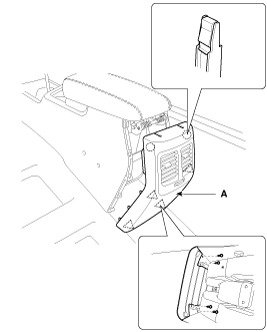
After loosening the mounting
screws, then remove the rear console cover (A).
|
| 3. |
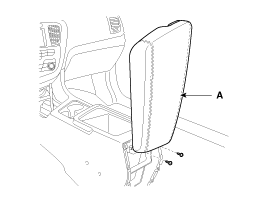
After loosening the mounting
screws, then remove the armrest assembly (A).
|
| 4. |
Installation is the reverse of
removal.
| •
|
Replace any damaged
clips. |
|
|
Components
[M/T]
1. Floor console assembly
2. Gear boots
3. Floor console upper cover
4. Floor console extension cover [LH]
5. Floor console extension ...
Components
1. Main crash pad assembly
2. Side speaker grille [LH]
3. Airbag blanking cover
4. Side speaker grille [RH]
5. Center speaker grille
6. Crash pad side cover [ ...
See also:
Manual Transaxle Operation
The manual transaxle has five forward gears. Press the clutch pedal down fully
while shifting, then release it slowly.
A special safety feature prevents inadvertent shifting from 5 (Fifth) to R ( ...
Console. Components and Components Location
Components
[M/T]
1. Floor console assembly
2. Gear boots
3. Floor console upper cover
4. Floor console extension cover [LH]
5. Floor console extension ...
Rear Body. Body Repair
Side outer panel rear corner
Rear package tray trim mounting hole
(Ø10)
Rear transverse trim mo ...



 Console. Components and Components Location
 Crash Pad. Components and Components Location