
 Kia Optima: Battery replacement
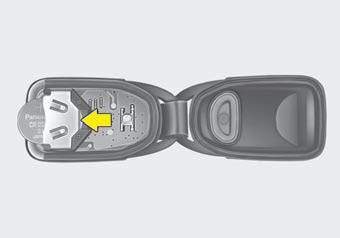
Type A
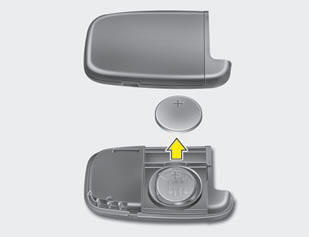
Type B
A battery should last for several years, but if the transmitter or smart key is not working properly, try replacing the battery with a new one. If you are unsure how to use or replace the battery, contact an authorized Kia dealer.
1. Pry open the transmitter or smart key center cover.
2. Replace the battery
with a new battery (CR2032). When replacing the battery, make sure the battery positive
“+” symbol faces up as indicated in the illustration.
3. Install the battery in
the reverse order of removal.
 CAUTION
- The transmitter or smart key is designed to give you years of trouble-free use, however it can malfunction if exposed to moisture or static electricity. If you are unsure how to use or replace the battery, contact an authorized Kia dealer.
- Using the wrong battery can cause the transmitter or smart key to malfunction. Be sure to use the correct battery.
- To avoid damaging the transmitter or smart key, don't drop it, get it wet, or expose it to heat or sunlight.
- An inappropriately disposed battery can be harmful to the environment and human health. Dispose the battery according to your local law(s) or regulation.
 Precautions
✽ NOTICE
The transmitter (or smart key) will not work if any of following occurs:
The ignition key is in the ignition switch.
You exceed the operating distance limit (about 30 m [90 feet ...
 Theft-alarm system
This system is designed to provide protection from unauthorized entry into the
vehicle. This system is operated in three stages: the first is the "Armed" stage,
the second is the " ...
See also:
Intake Manifold. Components and Components Location
Components
1. Intake manifold assembly
2. Electronic throttle body
3. Intake manifold stay
4. Intake manifold gasket
...
Installation
Brake Booster
1.
Installation is the reverse of
removal.
•
Before i ...
Steering Angle Sensor. Description and Operation
Description
The Steering Angle Sensor (SAS) is installed in MDPS (Motor Driven Power Steering)
and it sends messages to HECU through CAN communication line.The SAS is used
to determine turning di ...
Categories
Kia Optima Manuals
- Kia Optima DL3 2019-2026 Owners Manual
- Kia Optima DL3 2019-2026 Service and Repair Manual
- Kia Optima TF 2011-{2019} Owners Manual
- Kia Optima TF 2011-2026 Service Manual
- Kia Optima MS/Magentis 2000-2005 Owners Manual
