
 Kia Optima: Automatic Door Locks
Operating Door Locks - With the Key
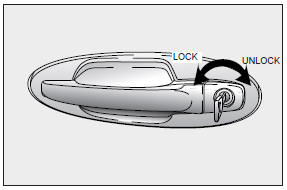
- Both front doors can be locked and unlocked with the key.
- Turn the key to the left to lock and to the right to unlock the door.
- Once a door is unlocked, it may be opened by pulling the door handle.
Operating Door Locks - Without the Key
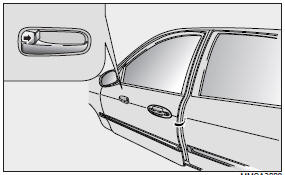
To lock a door without the key, push the inside door lock button to the “LOCK” position and close the door.
NOTICE
Always remove the ignition key, engage the parking brake, close all windows and lock all doors when leaving your vehicle unattended.
Two Turn Unlock System
At the driver’s door, if you would unlock the other doors, you must turn the key to the right twice within 3 seconds, but all for doors can be locked by turn the key once.
 Door Locks
...
 Operating Door Locks From Inside the Vehicle
To lock a door, push the door lock button to the “LOCK” position.
To unlock a door, push the door lock button to the “UNLOCK” position.
To open a door, pull the door handle outward.
...
See also:
Troubleshooting
Water Pump
Symptoms
Possible Causes
Remedy
Coolant leakage
•
From the bleed hole of
the water pump
...
Illuminated Ignition Switch
Whenever a door is opened, the ignition switch will be illuminated for your convenience.
The light will go off approximately 30 seconds after closing the door or when the
ignition key is inserted ...
Turn Signals
The ignition switch must be on for the turn signals to function. To turn on the
turn signals, move the lever up or down. Green arrow indicators on the instrument
panel indicate which turn signal ...
Categories
Kia Optima Manuals
- Kia Optima DL3 2019-2026 Owners Manual
- Kia Optima DL3 2019-2026 Service and Repair Manual
- Kia Optima TF 2011-{2019} Owners Manual
- Kia Optima TF 2011-2026 Service Manual
- Kia Optima MS/Magentis 2000-2005 Owners Manual
