
 Kia Optima: Removal
| 1. | Disconnect the negative (-) battery terminal. |
| 2. | Remove the steering wheel. (Refer to the ST group - "Steering column & shaft") |
| 3. | Remove the steering column upper
and lower shrouds after removing 3 screws.
|
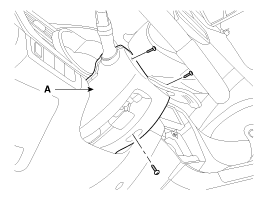
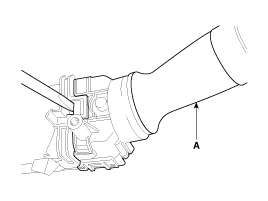
| 4. | If it is necessary to remove.
The wiper & washer switch (A) only, release the lock of wiper switch using
tool without removing the steering wheel and the clock spring.
|
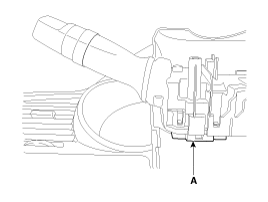
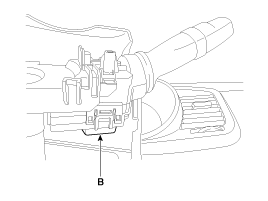
| 5. | Disconnect the lighting switch
connector (A) and wiper & washer switch connector (B).
|
| 6. | Remove the steering wheel. (Refer to the ST group - "Steering column & shaft") |
| 7. | Remove the clock spring. (Refer to the RT group - "Airbag module") |
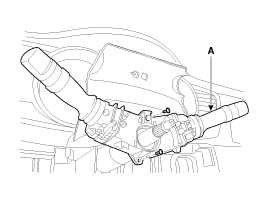
| 8. | Remove the multifunction switch
assembly (A) after loosening the mounting screws.
|
 Inspection (With GDS)
1.
Check BCM input/output specification
of multifunction switch using the GDS. If the specification is abnormal,
replace the lamp or wiper switch.
2.
If diagnosis is ...
 Installation
1.
Install the multifunction switch.
2.
Install the clock spring.
3.
Install the steering column upper
and lower shrouds.
4.
Install the s ...
See also:
Necessary Inspections
Fluid levels, such as engine oil, engine coolant, brake/clutch fluid, and washer
fluid should be checked on a regular basis, with the exact interval depending on
the fluid. Further details are pro ...
Components - 2 [ Seat folding ]
1. Headrest
2. Headrest guide
3. Rear side cover
4. Rear side frame assembly
5. Rear seat back cover
6. Rear back armrest
7. Rear seat cushion cover
8. Rear ...
Trunk Lid Open Warning Light
This light remains on
unless the trunk lid is completely closed. ...
Categories
Kia Optima Manuals
- Kia Optima DL3 2019-2026 Owners Manual
- Kia Optima DL3 2019-2026 Service and Repair Manual
- Kia Optima TF 2011-{2019} Owners Manual
- Kia Optima TF 2011-2026 Service Manual
- Kia Optima MS/Magentis 2000-2005 Owners Manual

Copyright © www.kiopman.com 2026