
 Kia Optima: Menu tree
The menu tree identifies available voice recognition Bluetooth® wireless technology functions.
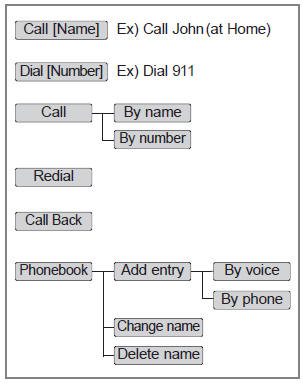
✽ Tip
■ Voice Operation
To get the best performance out of the Voice Recognition System, observe the followings:
- - Keep the interior of the vehicle as quiet as possible. Close the window to eliminate surrounding noise (traffic noise, vibration sounds, etc), which may disturb recognizing the voice command correctly.
- - Speak a command after a beep sound within 5 seconds. Otherwise the command will not be received properly.
- - Speak in a natural voice without pausing between words.
- - While receiving voice commands, press the
 button on the steering wheel remote
controller to terminate guidance. Voice command will convert back to waiting
mode to allow the user to say a new voice command.
button on the steering wheel remote
controller to terminate guidance. Voice command will convert back to waiting
mode to allow the user to say a new voice command.
 Voice Recognition Activation
The voice recognition engine contained in the Bluetooth® wireless technology
System can be activated in the following conditions: - Button Activation
The voice recognition system will be act ...
 Making a Phone Call
• Direct Calling
➀ Press button. ➁ Say the following command. - Call <John> : Connects the
call to John. - Call <John> on <Mobile> : Connects the call to John’s ...
See also:
Multimedia Jack. Description and Operation
Description
The multimedia jack on the console upper cover is for customers who like to listen
to external portable music players like the MP3, iPod and etc., through the vehicle's
sound syst ...
Instrument cluster
Type A
Type B
1. Tachometer 2. Fuel gauge 3. Speedometer 4. Turn signal indicators
5.Warning and indicator lights 6. Odometer/Trip computer*
* : if equipped
* The actual cluster in the vehic ...
Installation
1.
Installation is the reverse of
removal.
•
If you don't
...
Categories
Kia Optima Manuals
- Kia Optima DL3 2019-2026 Owners Manual
- Kia Optima DL3 2019-2026 Service and Repair Manual
- Kia Optima TF 2011-{2019} Owners Manual
- Kia Optima TF 2011-2026 Service Manual
- Kia Optima MS/Magentis 2000-2005 Owners Manual
