
 Kia Optima: Digital clock
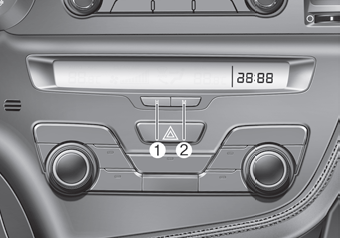
Type A
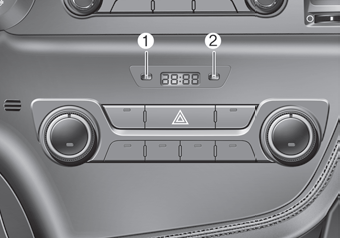
Type B
 WARNING
Do not adjust the clock while driving. You may lose your steering control and cause severe personal injury or accidents.
Whenever the battery terminals or related fuses are disconnected, you must reset the time.
When the ignition switch is in the ACC or ON position, the clock buttons operate as follows:
- HOUR (1) :
Pressing the H button will advance the time display by one hour. - MINUTE (2) :
Pressing the M button will advance the time display by one minute. - Display conversion: To change the 12 hour format to the 24 hour format,
press the H and M button at the same time for more than 5 seconds.
For example, if the time is 10:15 p.m., the display will change to 22:15.
 Power outlet
The power outlet is designed to provide power for mobile telephones or other
devices designed to operate with vehicle electrical systems. The devices should
draw less than 10 amps with the engin ...
 Floor mat anchor(s)
When using a floor mat on the front floor carpet, make sure it attaches to the
floor mat anchor(s) in your vehicle. This keeps the floor mat from sliding forward.
WARNING
The following must be ...
See also:
Inspection
1.
Check the signal waveform of the CMPS and CKPS using
the GDS.
Specification:
Refer to “Wave Form”
...
Care of discs
If the temperature inside the vehicle is too high, open the vehicle windows
for ventilation before using your vehicle audio.
It is illegal to copy and use MP3/WMA files without permission. Use ...
Installation
•
Install the component with the specified
torques.
•
Note that internal damag ...