
 Kia Optima: BLUETOOTH® PHONE OPERATION
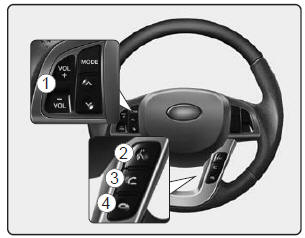
1. VOLUME button : Raises or lowers speaker volume.
2.
 button : Activates voice recognition.
3.  button : Places and transfers calls.
4.  button : Ends calls or cancels functions.
- What is Bluetooth® wireless technology?
- General Features
- Receiving a Phone Call
- Talking on the Phone
- Bluetooth® wireless technology Audio Music Streaming
- Phone Setup
- Voice Recognition Activation
- Menu tree
- Making a Phone Call
- Phone Book (In-Vehicle)
- Bluetooth® wireless technology Audio Speaker Adaptation
- Key matrix
 Using SIRIUS® Satellite Radio
Activation
In order to extend or reactivate your subscription to SIRIUS® Satellite Radio,
you will need to contact SIRIUS® Customer Care at 1-888-539-7474. Have your 12 digit
SID (Sirius® Id ...
 What is Bluetooth® wireless technology?
Bluetooth® wireless technology is a wireless technology that allows multiple
devices to be connected in a short range, low-powered devices like hands-free, stereo
headset, steering remote control ...
See also:
SIRIUS® Satellite Radio information
Satellite Radio channels:
SIRIUS® Satellite Radio has over 130 channels, including 69 channels of 100%
commercial-free music, plus sports, news, talk and entertainment available nationwide
in yo ...
Battery saver function
The purpose of this feature is to prevent the battery from being discharged.
The system automatically turns off the parking lights when the driver removes
the ignition key (smart key: turns o ...
Restraint of Large Children
As children grow, they may need to use new child restraints, including larger
child seats or booster seats, which are appropriate for their increased size.
A child who has outgrown available child ...
Categories
Kia Optima Manuals
- Kia Optima DL3 2019-2026 Owners Manual
- Kia Optima DL3 2019-2026 Service and Repair Manual
- Kia Optima TF 2011-{2019} Owners Manual
- Kia Optima TF 2011-2026 Service Manual
- Kia Optima MS/Magentis 2000-2005 Owners Manual
