
 Kia Optima: Key operations
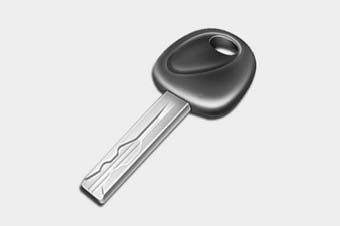
Type A
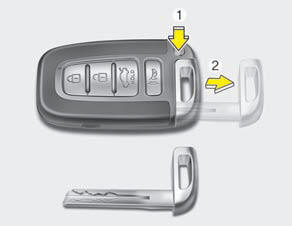
Type B
Type A
Used to start the engine, lock and unlock the doors.
Type B
To remove the mechanical key, press and hold the release button and remove the mechanical key.
To reinstall the mechanical key, put the key into the hole and push it until a click sound is heard.
 WARNING - Ignition key
Leaving children unattended in a vehicle with the ignition key is dangerous even if the key is not in the ignition switch. Children copy adults and they could place the key in the ignition switch. The ignition key would enable children to operate power windows or other controls, or even make the vehicle move, which could result in serious bodily injury or even death. Never leave the keys in your vehicle with unsupervised children.
WARNING
Use only Kia original parts for the ignition key in your vehicle. If an aftermarket key is used, the ignition switch may not return to ON after START. If this happens, the starter will continue to operate causing damage to the starter motor and possible fire due to excessive current in the wiring.
 Record your key number
The key code number is stamped on the bar code tag attached to the key set. Should
you lose your keys, this number will enable an authorized Kia dealer to duplicate
the keys easily. Remove the b ...
 Immobilizer system (if equipped)
Your vehicle may be equipped with an electronic engine immobilizer system to
reduce the risk of unauthorized vehicle use.
Your immobilizer system is comprised of a small transponder in the ignition ...
See also:
Removal
The side airbag cannot be disassembled from the seat back assembly, so replace
the seat back assembly when replacing the side airbag. ...
Air Ventilation Seat. Description and Operation
Description
Using the blows power of FAN on seat, remove the moisture, sweat and warmth from
occupants and surface of seats.It inhales the indoor air through the blower installed
at the seat cush ...
Components and Components Location
Components
1. HECU module
2. Front wheel speed sensor
3. Rear wheel speed sensor
4. Yaw rate & Lateral G sensor
5. Steering angle sensor
6. ABS Warning lamp
...
Categories
Kia Optima Manuals
- Kia Optima DL3 2019-2026 Owners Manual
- Kia Optima DL3 2019-2026 Service and Repair Manual
- Kia Optima TF 2011-{2019} Owners Manual
- Kia Optima TF 2011-2026 Service Manual
- Kia Optima MS/Magentis 2000-2005 Owners Manual
