
 Kia Optima: Fuses
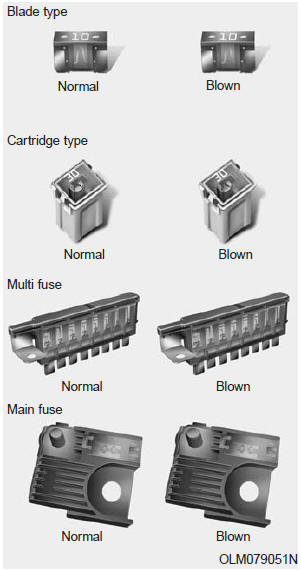
A vehicle’s electrical system is protected from electrical overload damage by fuses.
This vehicle has 2 fuse panels, one located in the driver’s side panel bolster, the other in the engine compartment near the battery.
If any of your vehicle’s lights, accessories, or controls do not work, check the appropriate circuit fuse. If a fuse has blown, the element inside the fuse will melt.
If the electrical system does not work, first check the driver’s side fuse panel. Always replace a blown fuse with one of the same rating.
If the replacement fuse blows, this indicates an electrical problem. Avoid using the system involved and immediately consult an authorized Kia dealer.
Three kinds of fuses are used: blade type for lower amperage rating, cartridge type, and multi fuse for higher amperage ratings.
 WARNING - Fuse replacement
- Never replace a fuse with anything but another fuse of the same rating.
- A higher capacity fuse could cause damage and possibly a fire.
- Never install a wire or aluminum foil instead of the proper fuse - even as a temporary repair. It may cause extensive wiring damage and a possible fire.
 CAUTION
Do not use a screwdriver or any other metal object to remove fuses because it may cause a short circuit and damage the system.
 Radial-ply tires
Radial-ply tires provide improved
tread life, road hazard resistance and
smoother high speed ride. The radial-
ply tires used on this vehicle are of
belted construction, and are selected
to ...
 Instrument panel fuse replacement
1. Turn the ignition switch and all other
switches off.
2. Open the fuse panel cover.
3. Pull the suspected fuse straight out.
Use the removal tool provided in the
engine compartment f ...
See also:
Knock Sensor (KS). Schematic Diagrams
Circuit Diagram
...
Removal
1.
Remove the rear wheel and tire.
Tightening torque:88.3
~ 107.9 N.m (9.0 ~ 11.0 kgf.m, 65.1 ~ 79.6 lb-ft)
2.
Remove the rear wheel speed ...
Inflation Pressures
All tire pressures (including the spare) should be checked monthly when the tires
are cold. “Cold Tires” means the vehicle has not been driven for at least three
hours or driven less than one ...
Categories
Kia Optima Manuals
- Kia Optima DL3 2019-2026 Owners Manual
- Kia Optima DL3 2019-2026 Service and Repair Manual
- Kia Optima TF 2011-{2019} Owners Manual
- Kia Optima TF 2011-2026 Service Manual
- Kia Optima MS/Magentis 2000-2005 Owners Manual
