
 Kia Optima: Interior overview
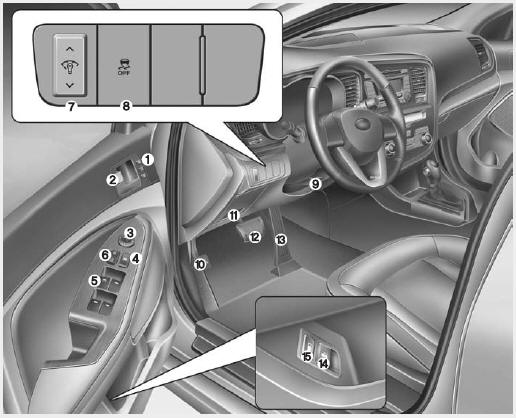
1. Driver position memory system*
2. Door lock/unlock button
3. Outside rearview
mirror control switch*
4. Power window lock button*
5. Power window switches*
6. Central door lock switch*
7. Instrument panel illumination control switch*
8. ESC OFF button
9. Steering wheel tilt lever*
10. Hood release lever
11.
Fuse box
12. Brake pedal
13. Accelerator pedal
14. Trunk lid release lever
15. Fuel filler lid release lever
* : if equipped

 Instrument panel overview
1. Instrument cluster 2. Light control / Turn signals 3. Wiper/Washer 4.
Horn 5. Steering wheel audio control* 6. Auto cruise control* 7. Driver’s
air bag 8. Steering wheel 9. Ignition switch* o ...
See also:
Trunk room lamp
The trunk room lamp comes on when the trunk is opened.
CAUTION
The trunk room lamp comes on as long as the trunk lid opens. To prevent unnecessary
charging system drain, close the trunk lid sec ...
Description and Operation
Description
Exhaust emissions (CO, HC, NOx) are controlled by a combination
of engine modifications and the addition of special control components.Modifications to the combustion chamber, intake m ...